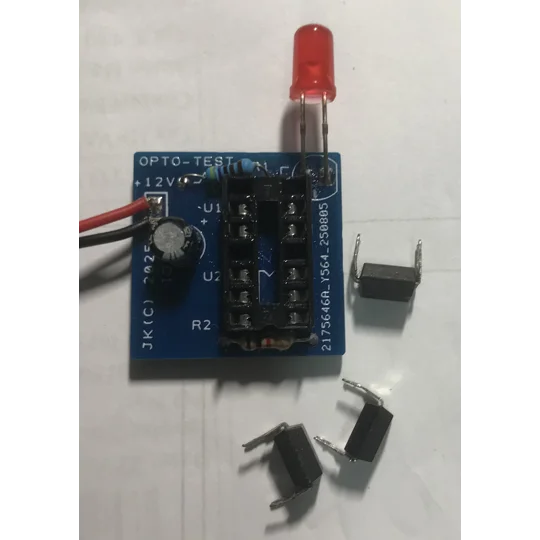
Opto Isolator Tester
Opto Isolator tester for 4 pin and 6 pin devices
Product Description: Optocoupler (Opto-Isolator) Tester PCB
Quickly Sort Good Optocouplers from Bad – No Complex Setup Required
In the world of electronics repair and troubleshooting, optocouplers (also known as opto-isolators) are critical components. They provide essential electrical isolation between different sections of a circuit, protecting sensitive low-voltage stages from high-voltage spikes. However, like any semiconductor device, they can and do fail. A partially shorted or sluggish optocoupler can lead to erratic power supply behavior, unstable feedback loops, or complete system failure.
Testing an optocoupler with just a multimeter is tedious, unreliable, and often inconclusive. That’s why we designed this dedicated Optocoupler Tester PCB – a simple, effective, and low-cost solution designed to provide a definitive go/no-go test for the most common 4-pin optocouplers.
What Does It Do?
This PCB is a dedicated functional tester for 4-pin optocouplers, including widely used models such as the PC817, 4N35, 4N25, 6N136, EL817, LTV817, TLP521, and many others. Its sole purpose is to verify that both internal sections of the optocoupler are working correctly: the infrared LED (input side) and the phototransistor (output side).
Instead of guessing or performing multiple resistance checks, this tester gives you a clear, visual pass/fail result in seconds.
How It Works (Simple & Elegant)
The circuit is refreshingly straightforward. It is powered by a 12V DC source – a common wall adapter, a benchtop power supply, or even a 12V battery will work perfectly.
-
Insert the optocoupler into the provided 4-pin socket, paying attention to the pin 1 orientation marker.
-
Apply 12V power. No switches, no buttons, no programming.
-
Observe the onboard LED.
If the optocoupler is fully functional, the built-in test LED will begin to flash continuously. This flashing indicates a healthy internal oscillator circuit, which proves that:
-
The optocoupler’s internal LED is turning on and off.
-
The optocoupler’s internal phototransistor is detecting that light and switching correctly.
If the optocoupler is faulty, one of two things will happen:
-
The test LED does not light up at all – This means the phototransistor side is dead (open circuit), or the internal LED is completely burnt out.
-
The test LED lights up but stays constantly ON (does not flash) – This indicates the phototransistor is shorted (stuck "on") or the internal LED is always emitting light due to an internal failure.
In either of the above failure cases, the optocoupler should be removed and replaced immediately.
Key Features
-
Purpose-Built: Designed exclusively for testing 4-pin optocouplers (PC817, 4N35 family, etc.).
-
Instant Visual Feedback: A single flashing LED tells you the component is good. Solid ON or OFF means it’s bad.
-
Dead-Simple to Build: The PCB is designed for hobbyists, students, and technicians of any skill level. Components are widely available and through-hole for easy soldering.
-
12V DC Powered: Uses a common, easily available power source.
-
Low Component Count: Reliable, minimal, and easy to troubleshoot.
-
Compact & Portable: Small enough to keep in your toolbox or on your workbench.
Who Is This For?
-
Repair Technicians: Quickly test optocouplers salvaged from old power supplies or new ones before installation.
-
Hobbyists & Makers: Verify components from untrusted batches or salvage boards.
-
Students: Learn how optocouplers behave in a live circuit.
-
Electronics Enthusiasts: Add a dedicated, time-saving tool to your bench.
What You’ll Need to Build It (Components Not Included)
The PCB is sold bare. To complete the tester, you will need:
-
1x 14-pin DIP IC socket (for the optocoupler under test)
-
1x standard LED (any color – serves as the test indicator)
-
1x appropriate 1k current-limiting resistor for the LED
-
1x 9V DC battery connector
-
A handful of passive components (2 resistors,1 capacitor) as per the circuit diagram (provided with purchase)
Note: A full schematic and component list are provided.
Important Usage Notes
-
Orientation Matters: Always ensure the optocoupler’s pin 1 (typically marked with a dot or chamfered edge) aligns with the PCB’s silkscreen marker.
-
Power Supply: Do not exceed 12V DC. Higher voltages may damage the test circuit or the optocoupler under test.
-
Test While Powered Off: Insert or remove optocouplers only when the 12V power is disconnected.
-
Component Heating: A faulty optocoupler may briefly get warm. This is normal. Disconnect power immediately if you see smoke or excessive heat.
Why Build This Instead of Using a Multimeter?
A standard multimeter diode test can only check the LED side of an optocoupler and can give misleading results on the transistor side due to leakage currents or residual gain. This tester dynamically checks both isolation and switching speed under real operating conditions. A flashing result guarantees that the device can actually switch a signal – not just that its junctions are intact.
Final Verdict
If you repair switch-mode power supplies, industrial controls, audio equipment, or any circuit that relies on galvanic isolation, this Optocoupler Tester PCB is a must-have. It transforms a guesswork-prone test into a definitive, one-second visual confirmation. Simple to build, satisfying to use, and incredibly handy to have on your bench.
Test with confidence. Flash means good – no flash means replace.
| Title | Opto Isolator Tester |
|---|---|
| Brand | JasonKits |
| Category | Test Equipment |
| SKU | thXBlzf |
| Condition | new |
| Weight | 30.0 g |
| Country of Origin | Malta |